Suprmind Review - Five AI Models Debating in One Thread
Welcome to our Suprmind review. If you have ever asked the same question in three different AI tools, gotten three different answers, and then spent an hour deciding which one to trust, this platform is built for exactly that frustration.
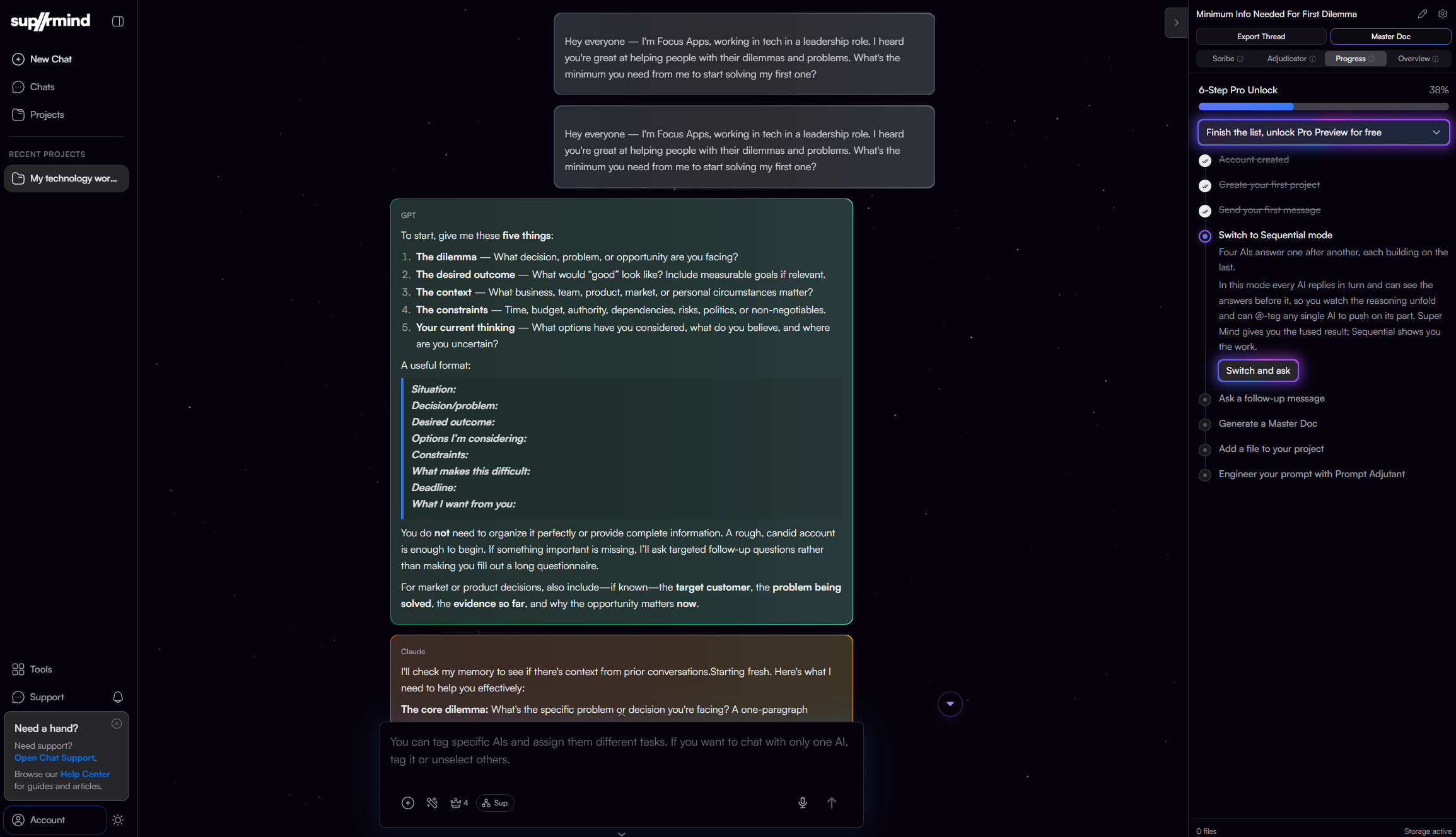
Suprmind puts five frontier models, GPT, Claude, Gemini, Grok and Perplexity, into a single conversation. The important part is not that there are five of them. It is that they read each other. In most modes, each model responds after reading everything that came before it, including the other models' disagreements, corrections and sources. The company calls this decision intelligence, and the pitch is simple enough: an AI sounds equally confident when it is right and when it is wrong, so give it four peers who have no reason to be polite.
We went through the product pages, the published research and the pricing tables to work out what Suprmind actually does, what it costs, and who should skip it. Everything below comes from Suprmind's own documentation and public material, with the caveats spelled out near the end.
The Problem Suprmind Is Trying to Solve
The homepage frames the problem in a way most AI users will recognise immediately:
- Every model starts from zero. Switching between ChatGPT and Claude means re-explaining the same context every time, and re-explaining introduces drift.
- You become the synthesis layer. Copying answers between tabs and weighing contradictions relies on your own pattern recognition, usually at the end of a long day.
- Nothing produces a document. After all that work you still have to write the memo, brief or recommendation yourself.
- One confident answer is the dangerous kind. A single model cannot tell you when it is wrong, because it has no second opinion.
Suprmind's answer is to run the models in one thread so that corrections happen live, and then turn the thread into an exportable document.
Why Suprmind Stands Out
The platform sums itself up in four numbers: 5 frontier AI models, 6 orchestration modes, 25+ document templates and 3 decision intelligence layers. Here is the feature set as the company lists it, minus the marketing adjectives:
- 5 frontier AIs in one chat: GPT, Claude, Gemini, Grok and Perplexity, each reading what came before it
- Six orchestration modes: Sequential, Super Mind, Debate, Red Team, First Principles and Research Symphony
- AI Teams: three preset teams called The A-team, Operators and Daily Drivers, with Smart Selector auto-routing per prompt
- Decision Intelligence layer: the Disagreement/Correction Index (DCI), the Adjudicator decision brief, and the Decision Validation Engine (DVE)
- Document Intelligence Pipeline: upload a long PDF once and every model answers from the same passages, with citations
- Master Document Generator: 25+ templates, export as Markdown, PDF or DOCX, charts embedded
- Scribe: a live sidebar that pulls decisions, risks and action items out of the conversation as it runs
- Smart Visualizations: the models draw bar, line, heatmap and table charts inline, downloadable as PNG
- Per-AI personality tuning: give each of the five models its own instructions inside a project
- Mode chaining: switch from Red Team to Debate to Sequential in the same thread without losing context
- Prompt Adjutant: paste a rough brain dump and get back a structured prompt the boardroom performs better against
- Run Inspector: per-call AI audit available on every plan
- AI Anti-Hallucinogen: a dual-layer hallucination mitigation system, passive multi-model correction plus an active independent verification layer called True North
- Controls: Deep Thinking, response length, custom Sequential order, stop and redirect, message queuing, voice, and per-project AI personalities
- Mobile: a Progressive Web App you install from the browser, no app store
- Hosted in the EU and Switzerland (application in Germany, database in Zurich), with billing handled by FastSpring as merchant of record
Orchestration Modes: Six Ways to Pressure-Test a Decision
This is the part of Suprmind that is genuinely different from a multi-model chat window, so it gets the detail.
| Mode | How it runs | Best for | Plan |
|---|---|---|---|
| Sequential | Models respond one after another, each reading everything before it | Complex analysis, research, architecture decisions | All plans |
| Super Mind | All five respond in parallel, a sixth AI synthesizes one answer with consensus and divergence mapped | Quick decisions, fact verification, time-sensitive calls | All plans |
| Debate | Models argue assigned positions in sequence, with rebuttals and counter-arguments, minority views preserved | Strategy validation, thesis stress-testing | Pro and above |
| Red Team | Models attack your plan from six angles: financial, technical, reputational, regulatory, operational, edge cases | Pre-launch validation, risk assessment, pre-mortems | Pro and above |
| First Principles | Each model names its assumptions, identifies the underlying axioms, then rebuilds the analysis from the ground up | Highest-stakes decisions where convention is suspect | Pro and above |
| Research Symphony | Five-stage pipeline: retrieval, analysis, fact-check, challenge, synthesis | Deep research, 10,000+ word reports with citations | Enterprise |
Sequential, Debate, Red Team and First Principles all use sequential orchestration, which is the slow, compounding path. Super Mind runs in parallel and trades depth for speed. Research Symphony is the automated pipeline, and it is Enterprise only.
You can chain modes mid-conversation. The example Suprmind gives is a realistic workflow: Red Team your plan, Debate the two biggest risks that surface, run Sequential on the resulting strategy, then export the executive brief. Same thread, same project memory, no re-briefing.
A few details behind each mode are worth knowing:
- Sequential gives each model a position-aware system prompt, so the first knows it is setting the foundation and the last knows it is closing. Response order is yours to set in Settings.
- Super Mind uses a dedicated synthesis engine that streams back one unified answer, with four selectable strategies: Synthesis, Comprehensive, Consensus-only and Adversarial.
- Debate runs three structured phases: opening statements, direct rebuttals, then a verdict written by a moderator that never took part in the debate. A Bridge-Builder persona looks for real common ground, and a minority opinion is never suppressed for losing four to one.
- Red Team follows the six attack vectors with a mitigation pass. Its output is an exportable risk dossier with a kill chain showing how small flaws cascade into total failure.
- Research Symphony runs 15 to 30 minutes in the background on dedicated infrastructure, with a push notification when it lands.
@Mentions: Direct Control Over Who Answers
Tag specific models to decide exactly who responds and in what order. The models you did not tag stay informed but silent. It works inside every mode, on every plan, which makes it the way Spark users steer the room.
@claude review this contractgets you Claude only, with the rest reading along@perplexity @gpt @claudeanswers in the order you tagged them, each building on the last@grok check sentimentplus@perplexity find competitorsplus@claude analyze bothgives each model its own assignment while all of them see the full context
Suprmind is clear that @mentions is an orchestration method, not a seventh mode.
What Each Model Brings to the Room
The platform treats the five providers as different rather than interchangeable:
- GPT (OpenAI): structured reasoning and technical precision, strong at breaking a messy problem into ordered parts
- Claude (Anthropic): nuanced analysis and close reading, catches edge cases, hidden assumptions and ethical exposure
- Gemini (Google): the largest context windows in the lineup, long-document synthesis, multimodal input, Google Search grounding
- Grok (xAI): fast reasoning with live web and X access, direct, and willing to tell the rest of the room it is wrong
- Perplexity: real-time research with citations, grounds the thread in current, checkable sources
Every seat runs the full reasoning variant from its provider. Versions rotate as providers ship, and you can swap which model fills any seat yourself in Settings.
The A-Team, Operators and Daily Drivers
Models are grouped into three teams you can pick per question, one seat per provider:
- The A-team (Pro and up): your smartest models, for high-stakes, novel or strategic problems where being wrong is expensive
- Operators (all plans): described as the realistic default for roughly 85% of work, strong and well rounded without running maximum brainpower at maximum cost
- Daily Drivers (all plans): speed and large context for quick lookups, document parsing, structured extraction and data work
Smart Selector (Pro and up) reads the whole thread plus the message you are about to send, then routes it to the best-fit team the moment you hit send. Pick a team manually and it applies to that turn only, then hands back to Auto. Suprmind says the per-turn reset is deliberate, because it stops the A-team quietly staying on and burning a month of usage in a week. Full Control pins your pick for the rest of the session if you want it. On Spark, where Smart Selector is not included, you steer with @mentions instead.
New provider models get added to the right team within a few days of hitting the API, and never more than a week later. Every team is editable in Settings, so you can build an all-flagship or all-fast roster yourself.
One smaller thing we liked: the Usage Control tab shows a plain-language runway, roughly how many days of work you have left at your current pace, with no token counters and no arithmetic.
Decision Intelligence: DCI, Adjudicator and DVE
Chaining five models together is not new. What Suprmind adds on top is a verification layer, and this is where the decision intelligence label comes from. Gartner recognises decision intelligence as a formal software category, and Suprmind positions itself inside it.
- Disagreement/Correction Index (DCI): scores how much the models agreed and disagreed across the conversation. Divergence appears as an inline card directly under the message bubbles the moment models split, plus a sidebar tab with per-turn and session totals. The topics that generated the most debate get flagged as the ones worth investigating.
- Adjudicator: a sidebar tab you invoke when a specific disagreement matters. It reads the Scribe notes and the full conversation, then streams a structured decision brief with context analysis, a recommendation and a confidence assessment.
- Decision Validation Engine (DVE): a six-stage pipeline for decisions you cannot walk back, run at suprmind.ai/validation.
The design choice worth noticing is that disagreement is preserved rather than averaged away. When four models agree and one dissents, a summarising layer would flatten the dissent. Here it is indexed and shown to you, and you make the call. In Suprmind's own words, DCI surfaces the split and the Adjudicator settles it, and gives you documentation for why you decided what you decided.
Inside the Decision Validation Engine
The DVE is the deepest thing in the product, and the six stages are worth spelling out:
- Intake: a three-step wizard capturing the decision statement, options, success criteria, constraints, risk tolerance and timeframe
- Clarify: Super Mind extracts a validation manifest, parsing ambiguities, identifying unstated assumptions and flagging missing information
- Red Team: adversarial attack across all six vectors, producing an FMEA-style risk register scored by severity, likelihood and detectability
- Debate: structured argumentation on the identified risks, producing a contention map of what is genuinely contested
- Synthesis: the final call, GO, NO-GO or GO WITH CONDITIONS, with reasoning attached to each risk that drove it
- Doc gen: an auto-generated decision dossier with executive summary, full analysis, minority opinions, action items and owners
The risk register ranks every risk by Risk Priority Number, so the list arrives sorted by what to handle first. The stated use cases are investment go or no-go, launch readiness, strategic pivots, vendor selection and major procurement.
The Hallucination Argument, With the Numbers
Suprmind publishes more evidence on this than most tools in the category, and it is worth reading before you decide. Figures quoted on the site:
- 17%+ error rate of purpose-built legal AI tools sold as hallucination-free (Stanford RegLab, Journal of Empirical Legal Studies, 2025)
- 51% of organisations reporting negative consequences from generative AI (McKinsey State of AI, November 2025, n=1,993)
- 4.5 hrs average weekly time professionals spend fixing or redoing AI output (Zapier, January 2026, n=1,100)
- 15x how far one leading model overstated its own score after failing a 20-item task (Cash and Oppenheimer, Memory & Cognition, 2025)
- $4.4M average loss per organisation from AI-related incidents (EY, 2025)
- 73% to 86% hallucination reduction with web search enabled
The company also runs its own research rather than only citing other people's. The Multi-Model AI Divergence Index (April 2026 edition, built from 1,324 production turns across 299 users, published under CC BY 4.0 with 12 downloadable CSVs) reports a 9.77x Perplexity vs Gemini catch ratio, 51.3% of Gemini's confident answers being contradicted, and 72.1% disagreement on financial questions. The same dataset is also reported as 3,484 unique insights across those turns, an average of 2.6 fresh angles per turn that no single model raised, 949 of them scored critical severity, and every one of the five models contributing between 339 and 636 insights, so no seat is a passenger. A live hallucination benchmark page is refreshed monthly across 50+ peer-reviewed sources (the September 2026 edition covers GPT-5.6 Sol, Claude Fable 5, Gemini 3.1 Pro and Grok 4.3), and a third study on positional divergence, meaning how a model's answer changes depending on whether it speaks first, middle or last in a sequential chain, is still listed as collecting data against a target of roughly 2,000 chains, with its original release date of late July 2026 already passed.
To its credit, Suprmind is direct about the limits. The FAQ says plainly that it does not eliminate hallucinations, because no tool does. The claim is narrower and easier to defend: five models from different providers fact-checking each other in real time catch fabricated claims far more often than any single model does.
The AI Anti-Hallucinogen: Two Layers
Suprmind now names this system, and the two layers are easier to evaluate separately than as one marketing term.
The passive layer is the conversation itself, live on every plan. Four other models are reading the answer in the same thread, and one of them frequently knows better, says so, replaces the bad claim and continues the reasoning from the corrected position. It costs nothing extra and needs no verification pass. The honest caveats Suprmind lists are worth repeating: a later model can wrongly challenge a correct answer, a confident first answer can anchor the four that follow, and agreement can reflect shared training rather than independent verification.
The active layer is True North, which the features page lists as live. It runs alongside the conversation, inspecting completed responses at response boundaries, and it has no stake in the answer because it is not one of the models that wrote it. It exists for the two cases the passive layer cannot handle: quiet misses where nobody challenges a wrong claim, and convergent hallucinations where several or all five models agree on the same externally false fact.
True North splits the work into three separate jobs, on the principle that no AI should grade its own homework:
- Analyze: a reasoning model reads each completed response and decides which claims are checkable and worth checking, meaning numbers, dates, named entities, citations, and legal, financial and scientific statements
- Research: a separate research system gathers current external evidence and returns evidence only, with no opinion on whether the claim is right
- Judge: a reasoning judge compares the claim against the evidence and rules SUPPORTED, CONTRADICTED or UNVERIFIABLE, with no hedging into a fourth option
UNVERIFIABLE does not mean probably false. It means the evidence was insufficient, inaccessible or ambiguous. Suprmind also states plainly what it does not claim: no zero hallucinations, no promise that five models always catch one another, and the observation that any product promising an AI that never invents anything is inventing something. The next step on the roadmap is the closed loop, where a confirmed contradiction gets injected back into the running thread so a bad claim stops propagating into later turns.
There is also a published example that shows the mechanism rather than describing it. A user uploaded two books and asked Grok to locate a specific passage and continue the paragraph. Grok produced fluent prose that read like a direct quote, referencing characters and locations from the books. It was not in the book. Claude then ran eight verification searches, found zero results, and identified four tells that proved fabrication, including generic phrasing, no page reference, and blended quote and interpretation. Suprmind presents this as a real conversation from a real session. With a single model, you would have had a confident paragraph and no reason to question it.
Document Intelligence and the Master Document Generator
This is the half of the product that turns a chat into something you can hand to someone else.
The Document Intelligence Pipeline exists because standard AI chat breaks down on long documents: every model has a different context limit, so they drift from the source in different directions. The pipeline pre-processes uploaded files into a shared, queryable knowledge layer. Drop in a 200 page PDF once and all five models answer from the exact same passages, with citations. It is available on Pro and above.
The Master Document Generator then converts any conversation into a deliverable. Suprmind lists 25+ templates spanning research, business, technical, marketing and communication: Executive Brief, Research Paper, Competitive Analysis, SWOT, Decision Record, Pitch Document, Statement of Work, Case Study, White Paper, Meeting Notes, FAQ and Onboarding Doc among them. You can generate at any point in the conversation, not just at the end, and generate more than one document from the same thread.
You also pick which model writes it, and the suggested logic makes sense: Claude for prose, GPT for technical rigour, Perplexity for citation-heavy work. Exports go to PDF and DOCX with charts embedded inline, and you can write your own template once and reuse it. Spark includes 8 templates, every plan above it gets all 25+.
There is also an auto-updating background Master Doc on every plan, which keeps a document in sync as the thread runs, rather than making you regenerate at the end.
Beyond master documents, the export list covers individual charts as PNG with a transparent background, the full thread as Markdown or plain text, and the Red Team risk dossier and DVE decision dossier as structured documents. Anything worth keeping can be saved into project knowledge so later conversations can use it.
The sample output shown on the site is an acquisition recommendation memo: Sequential mode, five models, 47 minutes, exported as PDF, with a verdict of do not acquire at $42M, revisit at $26M with net revenue retention turnaround proof. Sections include an executive summary, a five-model consensus matrix, disagreements and unresolved questions, a risk register drawn from Red Team output, and supporting evidence with citations. Whether or not you agree with the conclusion, that is a document structure a partner or investment committee can actually work from.
Scribe, Project Memory and Context Fabric
Suprmind says it solves context loss at four levels: within a turn, within a thread, within a project, and across every project you own. Four systems do that work:
- Context Fabric (all plans) keeps all five models synchronized. Every message, turn and tool output is logged in a central ledger, then the context is rebuilt per model on every turn: project instructions and memory first, then the master doc snapshot, then live Scribe entries, then recent turns in full, then this turn's responses untruncated, then your question, which is never cut. Older turns compress into rolling summaries, so in a 50-message conversation the models still remember message three.
- Server-side conversation memory (all plans): three of the five providers keep native server-side memory of the conversation, so they reference their own earlier reasoning rather than reconstructing it from re-sent text. The other two use prompt caching, and your usage is debited at the cached rate rather than the raw one.
- Document Intelligence Pipeline (Pro and up): text extraction, chunking, embedding, sibling artifact extraction for the figures, tables and code blocks inside a file, then retrieval at query time. Live status badges tell you when a file is indexing, ready or failed.
- Cross-thread Project Memory (all paid plans) keeps decisions, stated preferences, established facts, constraints and your own terminology across threads, so the tenth conversation in a project is meaningfully smarter than the first.
Scribe deserves a line of its own. It runs in the sidebar and captures decisions, constraints, assumptions, risks, action items and insights as they happen, each entry tagged with how much the models agreed on that point. Nothing to click, nothing to summarize afterwards.
The Project Knowledge Graph (Pro and up) passively extracts entities such as people, companies, technologies, decisions and concepts, plus the relationships between them, depends on, implements, replaces, relates to. Ask what depends on the deployment architecture and you get connected answers rather than a keyword match.
Master Project (Frontier and up) breaks the isolation between projects on purpose: query the knowledge graphs of every project at once, search files uploaded anywhere, reference a decision from another workstream, with source-project attribution on the results. There is also Save to Project, which turns a strong response into permanent searchable project knowledge, and Move to Project, which folds a chat you started outside a project into one with history intact.
Suprmind calls the compounding effect the flywheel: converse, save, index, compound. The pitch is that by month six the boardroom knows your competitors and remembers why you chose one architecture over another. That is the claim most worth testing over time, and the one no feature table can settle.
The Adjutant is still listed as coming soon on Frontier, Power and Enterprise. It is described as a passive second brain rather than an autonomous agent: it watches where a project stands, notices the thread you abandoned three weeks ago without concluding it, and recommends what to ask next. It does not act on your behalf, which is a deliberate and, we think, sensible line to draw.
The Smaller Things That Add Up
Several features are easy to miss in the feature list but change daily use:
- Per-AI personality tuning (Pro and up): five distinct voices in one project, so Claude can be the skeptic and Perplexity the citation checker
- Custom Sequential order (Pro and up): drag the models into the order that fits the work, for example Perplexity first on research-heavy tasks, or Claude leading when you want the deep analysis to set the frame
- Deep Thinking (all plans): every model reasons harder before answering, and the thinking blocks are preserved so you can audit how a conclusion was reached, not just what it concluded
- Response length (all plans): Key Points, Balanced or Full Detail. New chats start on Key Points, which is worth knowing if your first answers feel thin
- Stop and Redirect (all plans): interrupt any model mid-response, type your correction, and the interrupted model answers your redirect first while the rest follow
- Message queuing (all plans): send your next thought while the boardroom is still working, so you can plan a whole research sequence and walk away
- Language matching (all plans): write in Spanish, get five Spanish answers, switch to Japanese mid-thread and the room follows, with no language setting to change
- Personalization profile (all plans): describe your role and how you think once, and it is injected into every model's system prompt across every project and mode
- Smart Visualizations (all plans): bar, line, heatmap and table, more than one per response, interactive with hover values, zoom and pan. The Visuals tab collects every chart from the conversation and also accepts pasted data if you just want a chart out of some numbers
- Prompt Assistant (Pro and up): pastes a rough brain dump back as a structured prompt, and also writes your project instructions and per-model personalities from a project description
- Quick Tools (all plans, and free without an account): 13 instant local tools and 9 AI-powered ones, at suprmind.ai/tools, for the jobs that do not deserve a five-AI boardroom
- Soft delete with recovery (all plans): deleted sessions sit in a 30-day recovery window, no support ticket
- Voice in, voice out (Pro and up), native web search on every plan with Google Search Grounding from Pro upward, push notifications, and Run Inspector, the per-call audit that records system prompt, context, response, tools used and cost
Suprmind also publishes a 30 day activity counter on the pricing page. At the time of writing it showed 1.74B tokens processed, 5 frontier AI providers, 4 new AI models integrated and 2 research papers published, updated on August 21.
Files, Trust and Mobile
Three practical areas that decide whether you can actually use this at work.
Files. PDF, DOCX, TXT, Markdown, CSV, JSON, XLSX and code files, chunked into overlapping semantic passages and retrieved at query time. Attach a file and a banner shows per-model context utilization before you send, so you know in advance whether an upload will crowd out a model's window. Conversation history is kept for 30 days on Spark and indefinitely on every paid plan.
Trust. Coloured pills under each response show which tools it used, web search, X, your project files, the knowledge graph, Google grounding, and clicking a pill shows the actual URLs, page titles, filenames and relevance scores. When Perplexity or Grok pull from live sources their responses carry a fresh-data tag that later models treat differently from training-data knowledge. If one provider goes down, the other four carry on and you are told which one dropped, and Suprmind says it never silently substitutes a different model. Application hosting is in Germany with the primary database in Zurich, and Suprmind states that your data is not used to train models. DPA, MSA, security questionnaire responses and the sub-processor list are available on request for procurement.
Mobile. Suprmind is a Progressive Web App, installed in two taps on Android or through Share and Add to Home Screen on iOS. All five models, all six modes, file uploads, Scribe, master documents and voice, with push notifications and offline awareness. No app store, no separate download.
Who Suprmind Is Actually For
The site groups this into four jobs, and the framing is honest about who should not bother.
Strategy consultants are the obvious fit. The pitch is walking into a partner meeting with five frontier models already disagreeing on your behalf, and catching fabrications before the slides leave your laptop.
Founders and operators get the clearest example: run a $79 vs $149 pricing split through Debate mode and watch Claude argue retention, Grok argue elasticity, and Perplexity ground both in current benchmarks. That is a genuinely useful way to pressure-test a pricing change without hiring a research firm.
AI power users who are already paying for two or more AI subscriptions are the group with the simplest math. Five separate plans cost about $110 a month and never talk to each other. Suprmind Pro is $45, and Frontier is $95, all in.
Investment analysts get the IC memo use case: point five knowledge bases at the same question and build the strongest case for and against before capital gets committed.
The features page frames the audience slightly differently, and the four personas there are more useful for deciding whether you are the target:
- Professional synthesizers, called the north star user, produce substantial deliverables by orchestrating AI conversations. Before Suprmind: the same question through three tools, answers pasted into a doc, synthesis done by hand.
- Strategic leaders need several perspectives on a critical call without consulting five tools by hand. Before Suprmind: presenting a recommendation built on one model, then getting blindsided by the question it never raised.
- Researchers need broad coverage with genuinely diverse viewpoints. Before Suprmind: knowing one model has training gaps, with no way to find out where.
- Consultants whose analysis has to survive client scrutiny. Before Suprmind: shipping work built on one perspective, then scrambling when the client asks whether you considered X.
The workflows Suprmind maps modes onto are also concrete: strategic decision validation through the DVE, pre-mortem analysis by Red Teaming a launch plan then debating the three risks that matter, deep market research where Perplexity grounds the thread and Gemini synthesizes your uploads, and technical architecture review with a custom Sequential order so the security read lands before the scalability read and the cost read sees both.
Beyond those, the site also publishes how-to guides aimed at legal analysis, market research, risk assessment, due diligence, medical research, PPC copywriting, Amazon listings and regulatory compliance. That is a wide spread, and in our reading the common thread is narrower than the list suggests: Suprmind is worth the money when your work ends in a decision or a document that someone else will scrutinise. If your work is casual chat, image generation, or one model you already love, a single-AI plan is fine, and Suprmind says so itself.
The testimonials on the site come from founders, a marketing agency co-founder and a senior adviser at the EBRD, and they all describe the same thing: five angles on one question catching things they would have missed, and the document export saving hours on final reports. Read them as you would any vendor testimonial, but the pattern is consistent with the product design.
Pricing Plans
Every plan is billed monthly, with a 7 day free trial on Spark and no credit card required. Upgrades take effect immediately with prorated billing, downgrades apply at the next cycle, and there are no contracts on any self-serve plan.
| Plan | Price | Models in conversation | Modes | Projects / files | Notable extras |
|---|---|---|---|---|---|
| Spark | $19/mo | 4 providers | Sequential, Super Mind | 4 projects, 10 files | Scribe, 8 Master Doc templates, project memory, smart visualizations, web search, personalization |
| Pro | $45/mo | 5 frontier providers | Sequential, Super Mind, Debate, Red Team, First Principles | 20 projects, 30 files, 5MB | Decision Intelligence (DCI, Adjudicator, DVE), Document Intelligence, Knowledge Graph, AI Teams, voice, Prompt Assistant |
| Frontier | $95/mo | 5 frontier providers | Same as Pro | 50 projects, 60 files, 9MB | Master Project, priority response queue, early access, priority support |
| Power | $195/mo | 5 frontier providers | Same as Pro | Unlimited projects, 100 files, 15MB | BYOK, direct support channel with same-day response |
| Enterprise | Custom | 5 frontier providers | Adds Research Symphony | 150 files, custom size | Team seats with Read / Write / Admin, dedicated provider workspaces, managed allocation, 99.5% uptime SLA, DPA and MSA |
A few details that matter more than the table suggests:
- Spark Enhanced. If you subscribe during the 7 day trial, the account is upgraded to Spark Enhanced permanently, which adds the Adjudicator, 8 projects and 12 templates. That is worth knowing before you let the trial lapse.
- Usage is an allowance, not a message cap. When you get to around 80% you get a heads-up. Around 90% it switches you to the Daily Drivers team so you keep working, tells you what changed, and offers a one-click Usage Booster to bring the heavier teams back. Suprmind calls this no hard walls, and it is a friendlier approach than a hard stop mid-thread.
- No team features on self-serve. Team members, project-level permissions and team-level roles are Enterprise only. If you need shared projects with your colleagues, the $19 to $195 range is not your range. The permission model is worth noting though: Read lets someone view conversations and generate master documents without ever sending a message, which is a clean way to give legal or finance visibility. Write is full chat inside the project without access to project instructions or settings. Admin is everything. Team-level roles of Member, Admin and Owner sit above that.
- BYOK starts at Power. Bring your own API keys for any or all five providers, with per-provider toggles to mix platform keys and your own. Keys are encrypted at rest, never exposed in logs, revocable at any time, and the platform falls back and logs it if a key fails.
- Enterprise is more than seats. Dedicated provider workspaces so your queries are never pooled with other customers, managed allocation on one invoice instead of five, maximum-context models as standard, Research Symphony on dedicated infrastructure, direct founder support, and a 99.5% uptime SLA with service credits.
- Invoices come from FastSpring, Suprmind's merchant of record, which handles VAT and sales tax across jurisdictions. Your contract for the service is still with Suprmind.
Plan and model lineups change as providers ship new generations, so treat the table as a snapshot and check the official pricing page before subscribing.
Suprmind vs Five Separate AI Subscriptions
This is the comparison Suprmind puts front and centre, and it is worth reproducing because the arithmetic is the honest part of the pitch.
| Stack | Monthly cost | What you get |
|---|---|---|
| ChatGPT Plus | $20 | One model, one context |
| Claude Pro | $20 | One model, one context |
| Perplexity Pro | $20 | One model, one context |
| Google AI Pro (Gemini) | $19.99 | One model, one context |
| SuperGrok | $30 | One model, one context |
| Total, five separate | $109.99 | Five first drafts, zero shared context, you reconcile |
| Suprmind Pro | $45 | Five providers, six modes, Decision Intelligence, exports |
| Suprmind Frontier | $95 | Everything in Pro plus Master Project and priority queue |
The saving is the reason people arrive. The reason they stay, in Suprmind's own words, is that intelligence compounds instead of repeating: five separate subscriptions give you five first drafts, while Sequential mode gives you one draft and four rounds of review. The site also cites ensemble research, that an ensemble of 12 language models matched 925 human forecasters, and that orchestrated multi-model setups cut error amplification from 17.2x to 4.4x in Google Research testing.
We would put it slightly differently. The price comparison is real, but the deciding question is whether your work has a review step. If it does, five models reading each other is doing work you would otherwise do by hand, badly, at 4pm.
How It Compares to Other Multi-AI Tools
Suprmind publishes head-to-head pages against MultipleChat, Multipass AI, OpenRouter, TypingMind and Poe, so it knows exactly who it is being compared against. The table below is condensed from those pages.
One caveat before you read it: these are Suprmind's own comparison pages, so the competitor columns are Suprmind's characterisation rather than an independent audit. The MultipleChat page states prices were verified in September 2026; the Multipass, OpenRouter, TypingMind and Poe pages are dated June 2026. All of them change plans often, so check both sites before you buy.
| Capability | MultipleChat | Multipass AI | OpenRouter | TypingMind | Poe | Suprmind |
|---|---|---|---|---|---|---|
| Model lineup | Five families, two-role pipelines, four-model Compare Mode | Five in parallel, fifth slot is Llama | 300+ models from 60+ providers | BYOK to 7+ provider families | Thousands of bots on the major brands | Five frontier brands together on Pro and up |
| Do models read each other? | Partly, drafter and critic roles before synthesis | No, parallel consensus | No, routed per request | No | No, one bot per chat | Yes, Sequential chains each model onto everything before it |
| Structured modes | 9 collaboration modes plus Compare Mode | Consensus, Deep Research, Solo, Fast | Smart Chain, automated | Chat patterns only | None | 6 modes, chained without losing context |
| Disagreement handling | Conflicts parsed out and shown separately | Per-section agreement label: Universal, Strong, Majority, Divergent | None | None | None | DCI per turn and per session, plus Adjudicator decision briefs |
| Adversarial risk pass | Debate and Simulation modes | None | None | None | None | Red Team across six vectors, DVE ending in GO, NO-GO or GO WITH CONDITIONS |
| Deliverables | Document, Presentation, Data and Image Studios, native PPTX and XLSX | Agreement-labelled chat answer | Studios on the Smart plan | Artifacts, HTML and canvas | None beyond chat | Master Documents, 25+ templates, PDF, DOCX and Markdown with charts inline |
| Images and video | Generation and editing | Nano Banana Pro up to 2K | Via API models, not a chat studio | Via plugins and your own keys | Nano-Banana-Pro, Imagen, FLUX, DALL-E, Veo-3.1, Sora-2 | Charts and visualisations only |
| Entry price | Free tier, then $20/mo Pro | Free pilot, then $10/mo for 100 questions | Pay per token, 1M free BYOK requests a month | $39 lifetime plus your own API costs | Free tier, then $4.17/mo yearly | 7-day trial, then $19/mo Spark |
| Pricing shape | Seats from $25 | Per-question metering | Usage-based passthrough, no subscription | One-time license plus BYOK | Points that burn at different rates per bot | Flat tiers, no per-question cap |
| Built for | Broad production bundle and asset creation | Fast verification of a single answer | Developer API integration | BYOK power-user frontend | Bot exploration and visual generation | Decisions and documents that have to survive scrutiny |
Where the Alternatives Genuinely Win
Suprmind's comparison pages are unusually good at naming what the competitor does better, which makes them worth reading rather than dismissing:
- MultipleChat adds native PPTX decks with speaker notes, XLSX spreadsheets with formulas, image generation and editing, a permanent free tier, published self-serve team seats from $25, and SSO, SAML and SCIM today rather than on a roadmap.
- Multipass AI adds a per-section agreement label with one-click drill-down, a one-click Fact Check across all five models, Nano Banana Pro image generation, and per-question pricing that is simpler to budget at around 100 questions a month.
- OpenRouter is the right tool if you are calling models from application code: an OpenAI-compatible endpoint, 300+ models, configurable per-request fallback chains, passthrough pricing with no platform markup, and 1M free BYOK requests a month. Suprmind does not compete there at all.
- TypingMind sells a one-time lifetime license at $39, $79 or $99 with free updates, bills your provider keys directly with no markup, ships a self-host package on every paid tier, and has a plugin SDK and marketplace.
- Poe has the largest bot marketplace in consumer AI with 500K+ community bots and a creator economy, image and video generation across several providers, and native iOS, Android, Mac and Windows apps.
The recurring distinction Suprmind draws is sequential versus parallel. Most multi-AI tools fire your question at five models and show you five separate answers, which leaves the reconciliation to you. Suprmind's core modes make each model respond after reading everything before it, so the fifth answer is built on four layers of reasoning. Super Mind is the exception and runs in parallel with a sixth model synthesising.
Suprmind draws the line itself, and it is the fair way to draw it: an aggregator gives you access to multiple models, while Suprmind orchestrates collaboration between them. Different product category, or at least that is the claim, and the sequential modes are the evidence for it.
Against single-model chat, the site lists the same contrasts we would: one perspective versus five reading each other, manual comparison across browser tabs versus shared context and automatic synthesis, contradictions smoothed over versus scored and settled, and copy-pasting output into a document versus 25+ templates with charts inline.
Things to Be Aware Of Before You Buy
A review that only lists strengths is marketing, so here is what we would watch:
- Sequential is slower by design. If you need an answer in seconds, five models reading each other is not the fast path. Super Mind exists for that, and mode switching is instant.
- Most of the decision layer is Pro and above. DCI and the Decision Validation Engine start at $45 a month, and Spark runs four providers rather than five. The one exception is the Adjudicator, which a Spark account gains through the Spark Enhanced upgrade if you subscribe during the trial.
- Team work is Enterprise only. No shared seats or permissions on the self-serve plans.
- Usage is an allowance. Heavy users will hit it and will be routed to lighter models unless they buy a Usage Booster. The graceful degradation is good manners, but it is still a limit.
- Status of the newest features is inconsistent across the site. True North is listed as live on the features page but still shows "coming soon" on the pricing table, and the Adjutant is coming soon on Frontier, Power and Enterprise. Check what is actually switched on in your account rather than assuming.
- The passive layer has known failure modes, and Suprmind admits them. A later model can wrongly challenge a correct answer, a confident first answer can anchor the four that follow, and five models agreeing may reflect shared training rather than independent verification. True North exists for exactly those cases, and UNVERIFIABLE is not the same as false.
- Model lineups move. Provider names and versions change within days of release, so any review, including this one, goes stale on that point quickly.
- File formats and access models are narrower than some competitors. Master Documents export to PDF, DOCX and Markdown. There is no native PPTX, XLSX or image generation, no permanent free tier, no direct import of your ChatGPT or Claude history, and no self-serve team seats. Suprmind lists all of these openly on its own comparison pages, which is to its credit.
- Pricing and availability change. Confirm the current plan list, model counts and included features on the official pricing page before you subscribe.
Frequently Asked Questions
What exactly is Suprmind? A multi-AI decision intelligence chat platform. It orchestrates five frontier models, GPT, Claude, Gemini, Grok and Perplexity, in one conversation, where each reads what the others said before responding. Disagreements are tracked, and you can export the conversation as a professional document.
How is this different from switching between ChatGPT and Claude, or from five browser tabs? Each tool starts from zero when you switch. No shared context, no cross-referencing, no disagreement tracking. In Suprmind every model reads the full thread, so Claude sees what GPT said before writing its own answer, corrections happen live, and reasoning compounds instead of resetting.
Is Suprmind just an AI aggregator? No, by its own definition and by how it behaves. An aggregator gives you access to multiple models, usually one at a time or side by side. Suprmind puts them in the same thread with shared context and controls how they interact, so the models read each other.
Does Suprmind eliminate AI hallucinations? No, and the company says so directly. No tool does. The claim is that five models from different providers fact-checking each other in real time catch fabricated claims far more often than a single model would, with True North adding independent verification behind them and ruling SUPPORTED, CONTRADICTED or UNVERIFIABLE.
Can I switch modes mid-conversation? Yes, and it is the workflow Suprmind pushes you towards. Every model carries full context across the switch, so you can Red Team an idea, Debate the risks that surfaced, then run Sequential on the surviving plan without restating anything.
Can I export the conversation? Yes. The Master Document Generator turns any conversation into a document from 25+ templates, exported as Markdown, PDF or DOCX, and you choose which model writes it.
Can I bring my own API keys? Yes, on the Power plan and on Enterprise.
Is there a free trial? A 7 day free trial on Spark with no credit card required. Enterprise customers can request a personalised demo.
Final Verdict: Is Suprmind Worth It?
Suprmind is not trying to be a better ChatGPT. It is trying to be the review meeting you never had, and on its own terms it is convincing.
The orchestration is the substance. Sequential, Debate, Red Team and First Principles are not five chat windows with different logos, they are distinct thinking patterns, and being able to chain them inside one thread without losing context is a genuinely useful idea. The Decision Intelligence layer adds something most multi-model tools skip: it treats disagreement as the output rather than noise to be smoothed over, and the DCI, Adjudicator and DVE turn that into something you can act on.
The published research is the other thing that earns credibility here. Any tool in this category can cite Stanford and McKinsey. Running your own divergence index on 1,324 production turns, publishing the CSVs under CC BY 4.0, refreshing a hallucination benchmark monthly, and then writing down the three ways the passive correction layer fails is a different level of seriousness. The dual-layer Anti-Hallucinogen is the right architecture for the problem, and SUPPORTED, CONTRADICTED, UNVERIFIABLE is the right set of verdicts, because it leaves room for honest uncertainty instead of forcing a binary.
The pricing holds up, with one condition. At $45, Pro costs less than three single-AI subscriptions and gives you five providers plus the verification layer. At $19, Spark is cheaper than one ChatGPT Plus and runs four providers, which is a low-risk way to see whether orchestration suits you. The condition is that the value shows up only when your work ends in a decision or a document. For casual chat, this is overkill, and Suprmind says so on its own pricing page.
The limits are real too: most of the decision layer starts at Pro, team seats are Enterprise only, usage is an allowance rather than unlimited, and the Adjutant is still on the way. Even the shipped features come with an asterisk, since the site currently describes True North two different ways depending on which page you read. None of this is disqualifying, but it should shape which plan you pick.
Review Summary
- Ease of Use: ⭐⭐⭐⭐ (4/5) - modes and AI Teams take a session or two to get used to
- Feature Depth: ⭐⭐⭐⭐⭐ (5/5) - six modes, three verification layers, document pipeline
- Output Quality: ⭐⭐⭐⭐½ (4.5/5) - sequential review is a real step up, not a gimmick
- Hallucination Handling: ⭐⭐⭐⭐½ (4.5/5) - strongest published evidence in the category, still not a guarantee
- Pricing and Value: ⭐⭐⭐⭐ (4/5) - Pro at $45 beats three separate plans, Enterprise is opaque
- Transparency: ⭐⭐⭐⭐⭐ (5/5) - original research, published methodology, honest FAQ
- Overall Review Score: ⭐⭐⭐⭐½ (4.5/5)
Best for consultants, analysts, founders and operators whose work has to survive a client, a partner or a board.
Skip it if you mostly need quick answers, image generation, or you are happy inside a single model.
👉 Try Suprmind free for 7 days, no credit card required. Start in Sequential mode with a decision you have been putting off, and watch what happens when the five models start disagreeing with each other.
Tags
# Review# Suprmind# multi-AI chat platform# multi-AI decision intelligence# five AI models in one conversation# AI hallucination detection# AI boardroom# sequential AI orchestration# decision intelligence platform# AI subscription comparison# ChatGPT vs Claude vs Gemini# best AI subscription for professionals# AI document generator# Red Team mode# Debate mode# GPT# Claude# Gemini# Grok# PerplexityFollow for new blogs
Subscribe to our blog
Subscribe to Newsletter
Subscribe to our newsletter to get the best products weekly.